Public beta on TestFlight

See the month.
Run the day.

A native iPhone calendar for the month, agenda, reminders, widgets, and local digest alerts. It works with the calendars and reminder lists already on your device. The public beta is available through TestFlight.
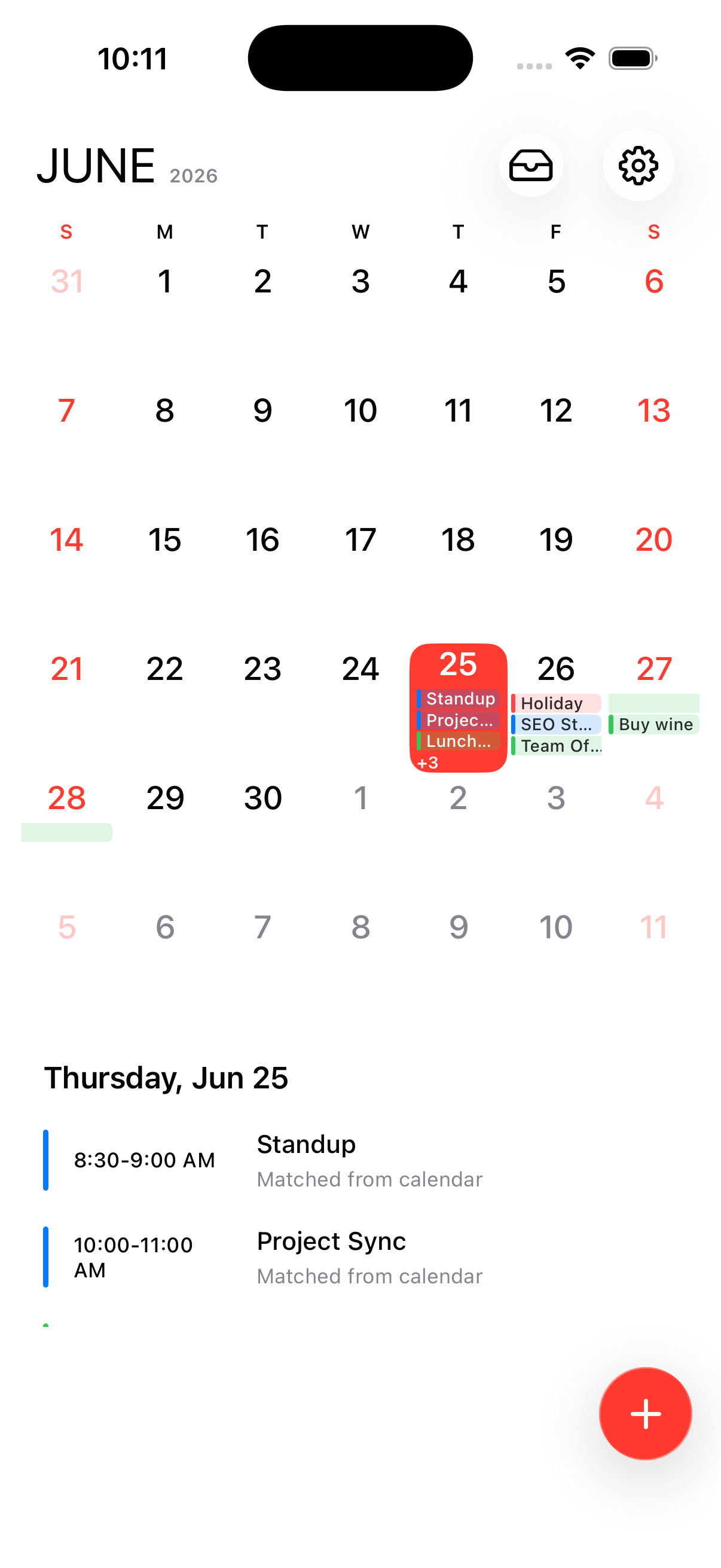
Notics app running on iPhone, showing the June month grid and agenda

Captured from the running Notics app

SwiftUI native Calendar + Reminder access Local notifications Shared widget settings
How it works

From month view to a planned day.

Open the month, pick a date, and add an event or reminder without leaving the calendar flow.

1
Actual Notics month view captured from the iPhone simulator

Open the month

See six weeks at once, with today, event chips, reminders, and weekends clearly separated.
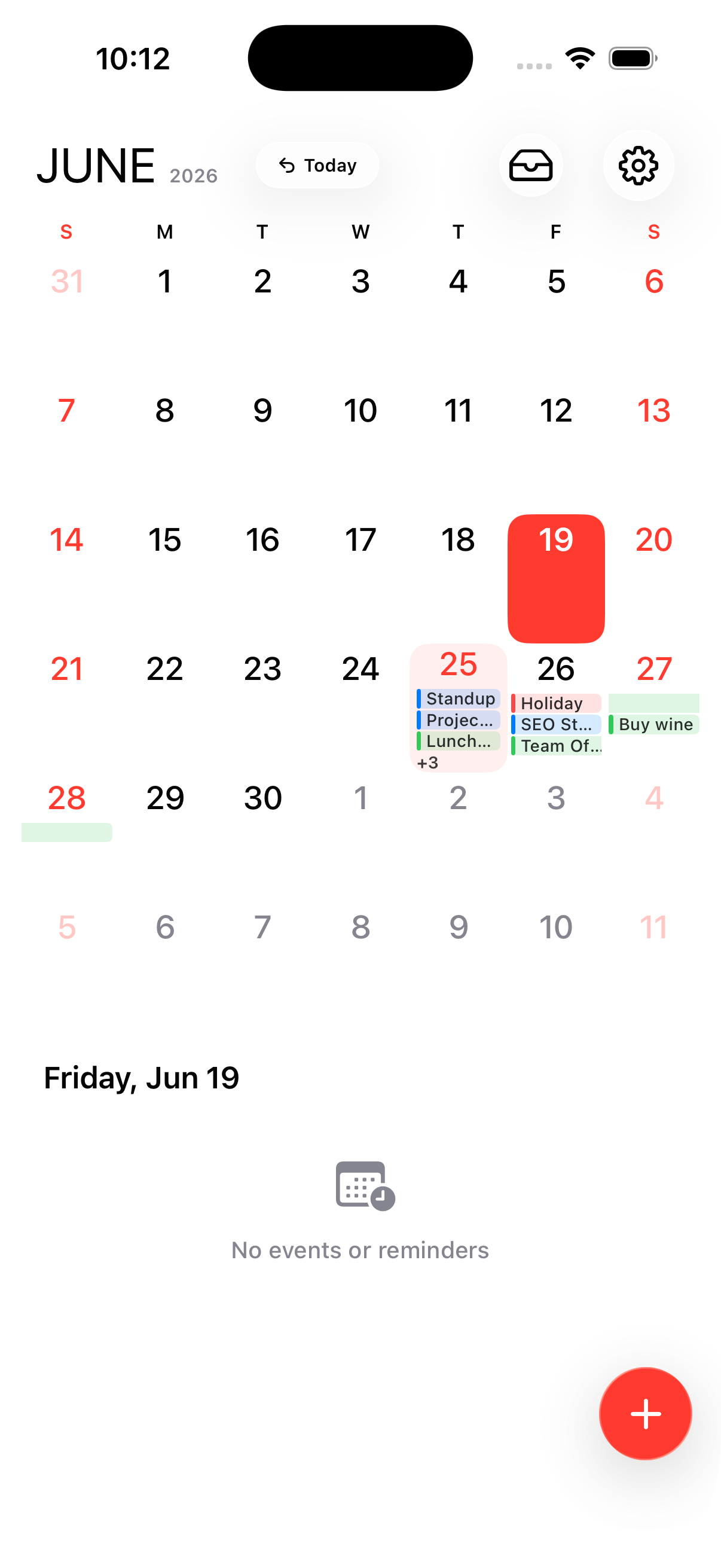
2
Actual Notics selected-day view captured from the iPhone simulator

Choose a day

The selected date becomes the focus while the agenda updates underneath the grid.
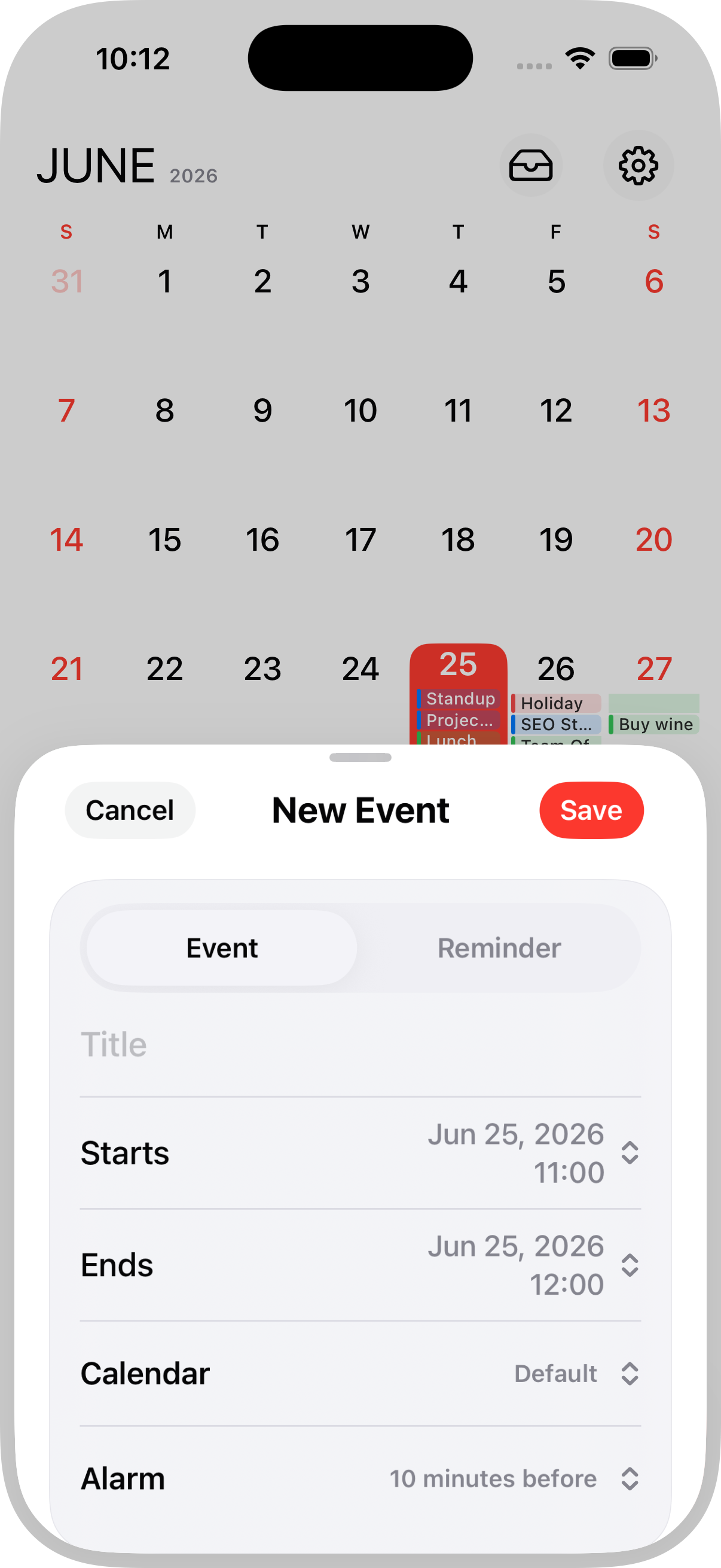
3
Actual Notics New Event sheet captured from the iPhone simulator

Add from the sheet

The add button opens the real event editor with event/reminder mode, dates, calendar, and alarm controls.

Try it yourself

Feel the app, right here.

A working replica of the Notics month and agenda screen — the same layout, the same gesture math, the same motion. Swipe it like you would on iPhone.

Step 1
Swipe the agenda sidewaysSlide across up to ±3 days and watch the liquid highlight travel through the month grid.
Step 2
Tap a reminder's circleCompletes it in place — the row settles to the bottom of the day, just like the app.
Step 3
Swipe the agenda upwardExpands into the full-screen Upcoming list. Drag down from the top to come back.
Free play
Now make it yours.Tune the gesture speed and keep exploring — every interaction here runs the app's real math.
Gesture speed1.00×
Day swipe distance54 pt
Expand distance64 pt

Rebuilt for the browser from the app's SwiftUI source — the same numbers the app ships with.

Native flow

Plan from the month grid,
without jumping around.

Notics keeps the calendar, agenda, and editor close together, with SwiftUI glass, familiar gestures, and no account-based dashboard in between.

  • Month and agenda together so planning never splits across screens.
  • A persistent add button for events or reminders from the current date.
  • Native sheets and gestures with the same motion language as the app.
JUNE2026
↺ Today
AllEventsReminders
Design review
Today · 10:00
Lunch with Sam
Today · 12:30
Call mom
Reminder · no date
Gestures

Move through days
without losing context.

Swipe across nearby dates, expand the agenda when the day gets busy, and tune the interaction speed in settings.

  • Adjustable sensitivity and scroll speed, yours to tune.
  • Horizontal day swipe of ±3 days from the agenda.
  • Fullscreen exit by drag distance, not a button.
Agendaexpanded
Design review
10:00 – 11:00 · Work
Lunch with Sam
12:30 – 13:30 · Personal
Ship Notics 2.0
All-day · Team
Pick up dry cleaning
Reminder · 17:00
Evening run
19:00 – 19:45
Reminder inbox

Keep undated reminders
out of the calendar.

Tasks without dates live in a dedicated reminder inbox, so they stay visible without cluttering the month grid.

  • A dedicated inbox for reminders without a date.
  • Tap to complete with a satisfying strike-through.
  • Schedule or delete right from the tray.
Reminder Inbox4 items
Call mom
No date · Personal
Reply to Maya's email
No date · Work
Renew gym membership
No date · Errands
Pick a wallpaper
No date · Home
Product details

Everything daily planning needs.

Month planning, agenda review, reminders, search, settings, digest notifications, and widgets all stay in one native workflow.

EventKit calendar core

Reads and writes the calendars already configured on the device, including iCloud, Google, Outlook, and Exchange sources exposed by iOS.

Reminder inbox

Undated reminders have their own panel, so tasks without a date stay visible without crowding the calendar month.

Spotlight-style search

Search across events and reminders with clear filters for all items, calendar events, or reminders only.

Gesture preferences

Quick Start helps tune gesture sensitivity, horizontal day swipes, agenda expansion, and first-day-of-week preferences.

Daily digest

Optional local notifications summarize the upcoming agenda using the digest window and sound settings selected in the app.

Widget families

Today, Today Agenda, and Month widgets share the active Notics appearance so the home screen matches the app.

Under the hood

Small details, done natively.

The pieces you feel every day — frameworks, alerts, gestures — are built straight on iOS, not wrapped around it.

01
Apple frameworks

Native down to the data layer.

  • SwiftUIEvery screen, sheet, and transition
  • EventKitReads & writes your real calendars
  • WidgetKitThree themed widget families
  • UserNotificationsDigest scheduled on the device
02
Daily digest

One heads-up, then quiet.

03
Reminders

Complete with one tap.

04
Gesture tuning

Motion that matches your thumb.

Set once in Quick Start, adjust anytime in Settings → Gestures.

Widgets

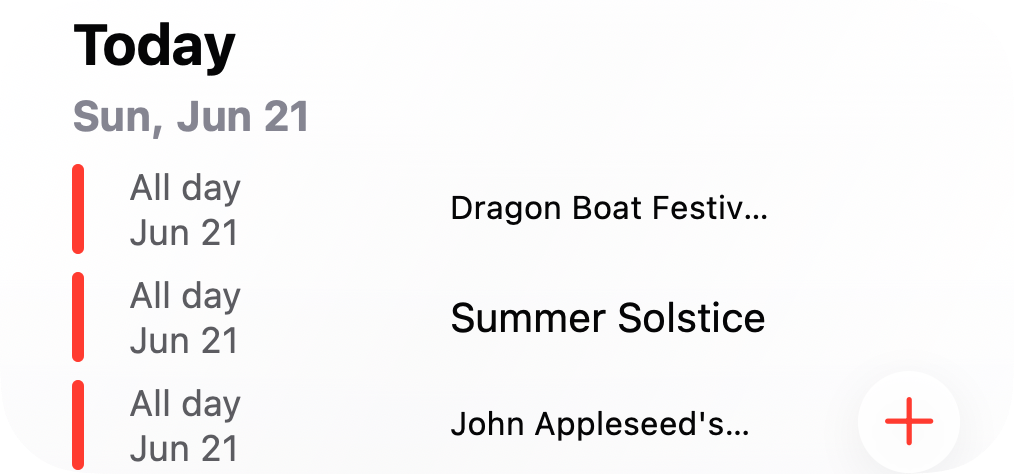
Real Notics widgets, not mock cards.

Today, Today Agenda, and Month use the same WidgetKit layout and sample data as the app extension.
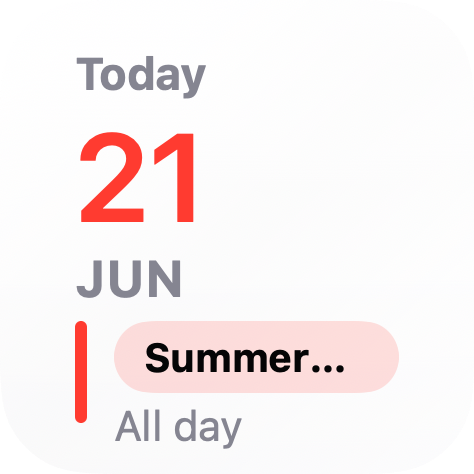
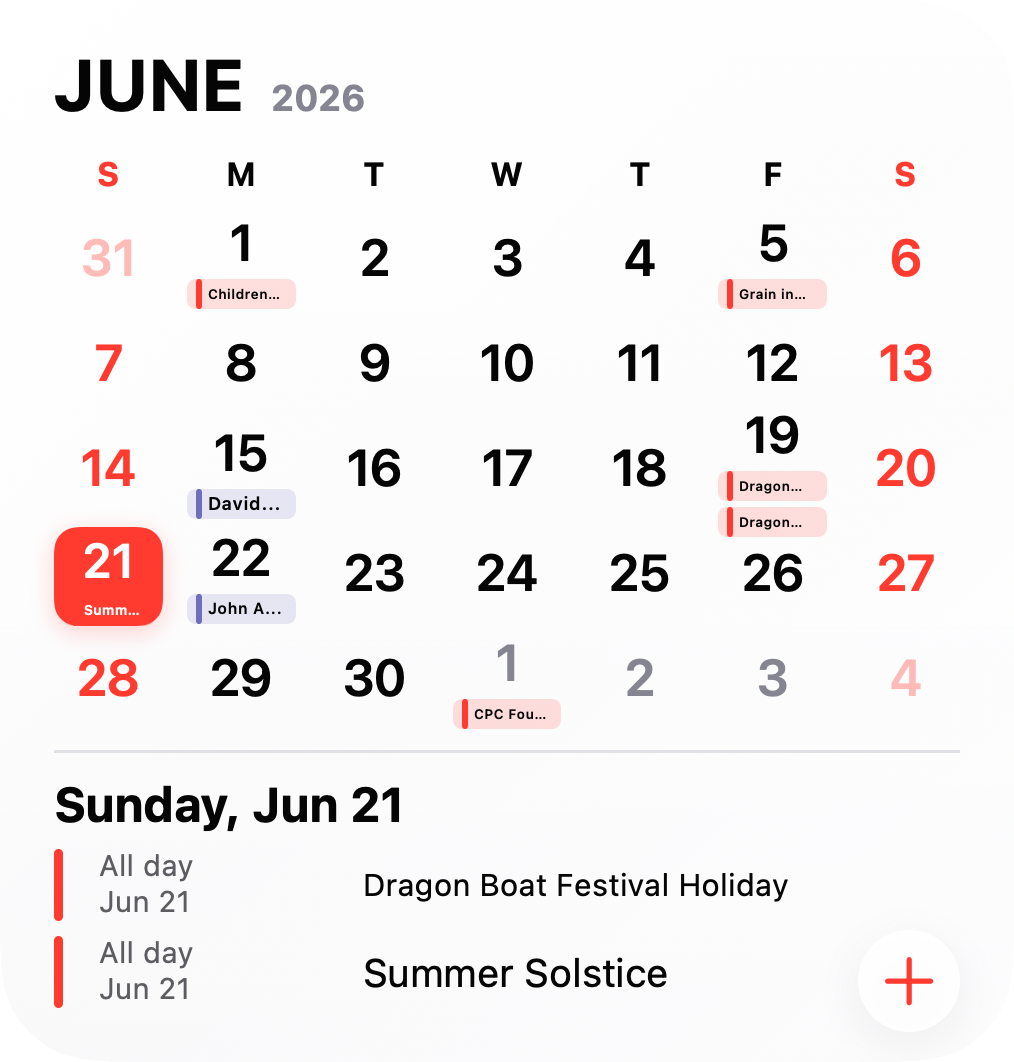
Notics Today widget showing June 21 and the Summer Solstice
TodaySmall date card with the next all-day item.
Notics Today Agenda widget showing three all-day items for June 21
Today AgendaMedium current-day list with the Notics add action.
Notics Month widget showing a June calendar grid and selected-day agenda
MonthLarge calendar grid with selected-day agenda.
Themes

Themes that carry through the app.

Each theme uses the same palette, preview style, and alternate icon bundled with Notics.

Theme
Light
Clean system light mode
Light Notics app icon
Theme
Dark
Clean system dark mode
Dark Notics app icon
Theme
Morning
Warm orange highlight
Morning Notics app icon
Theme
Midnight
Cool blue night highlight
Midnight Notics app icon
Theme
Dust
Muted clay highlight
Dust Notics app icon
Theme
Open Retro
Retro orange highlight
Open Retro Notics app icon
Theme
Cara
Soft violet highlight
Cara Notics app icon
Theme
Mint
Fresh green highlight
Mint Notics app icon
Theme
Black
Neutral gray highlight
Black Notics app icon
Theme
Velma
Bright purple highlight
Velma Notics app icon

Real app icons, not placeholders.

These are the same iOS icon files bundled with the app themes.

Light Notics app icon
Light
#FF3B30
Dark Notics app icon
Dark
#FF453A
Morning Notics app icon
Morning
#FF9F0A
Midnight Notics app icon
Midnight
#64D2FF
Dust Notics app icon
Dust
#B1785B
Open Retro Notics app icon
Open Retro
#E85D04
Cara Notics app icon
Cara
#AF52DE
Mint Notics app icon
Mint
#34C759
Black Notics app icon
Black
#8E8E93
Velma Notics app icon
Velma
#BF5AF2
26.5iOS deployment target
10Themes + alt icons
3Widget families
100%Native SwiftUI
Your calendar should show the full day without making you manage another system.
Notics design principle
Privacy model

Your iOS data stays the source of truth.

Notics uses Apple's Calendar and Reminders frameworks to read and update the data already on your device. Digest alerts are scheduled locally.

No servers No cloud sync
No tracking No analytics iOS calendars
iOS reminders No third parties No ads EventKit framework
Local notifications Local digest Private by design No sign-up On-device only
You own your data Works offline No data collection No push servers
Nothing leaves your phone No hidden trackers Apple frameworks only
Your device, your rules Fully transparent

Calendar and reminder data stays in the iOS sources you already use.

FAQ

Good to know.

Does Notics work with my existing calendars?

Yes. Notics reads and writes through EventKit, so every iCloud, Google, Outlook, or Exchange calendar already on your iPhone just works. No accounts to create, no data leaves your device.

Is my data sent to a server?

No. Notics is fully on-device. There are no accounts, no analytics, and no tracking. The daily digest is a local notification scheduled by your phone.

Do the widgets match my theme?

Yes. Widgets read the shared Notics appearance settings so their colors and surfaces stay aligned with the app.

What iOS version do I need?

Notics targets iOS 26.5 and uses the Liquid Glass APIs introduced in iOS 26, so it needs a device running iOS 26 or newer. See support for details.

Can I change the first day of the week?

Yes — Sunday, Monday, or Saturday. You can also choose which weekdays get the accent highlight, and whether to show holiday labels.

Does it support iPad and Mac?

Notics adapts its layout for tablet portrait, tablet landscape, and a wider desktop gallery, so it scales beautifully across iPhone, iPad, and Mac.

Public beta

Join the public beta on TestFlight.

Notics targets iOS 26.5 or newer and is available through a public TestFlight link while it is in beta.

Public beta
TestFlight for iPhone
Install Notics from the public TestFlight beta and try the native month, agenda, reminders, and widgets workflow.
  • Month + agenda calendar
  • Events & reminders unified
  • Spotlight search
  • Reminder inbox
  • Quick Start setup
Join Public Beta
Widget extension
WidgetKit themes
Home-screen widgets use the same active appearance and alternate icon language as the app.
  • All 10 themes + alt icons
  • Today, Today Agenda & Month widgets
  • Daily digest notifications
  • Per-calendar colors & alerts
  • Adaptive light/dark switching
View widget demo

Join the Notics public beta.

Open the TestFlight link to install Notics on iPhone and send feedback as you try it.